Staying safe: Ignore and Report
Playing together
You don’t have to put up with a player who spoils your game. Two buttons deal with it.
Ignore
- Open the player’s menu (right-click them, or tap on a phone) and press Profile.
- Press Ignore on their card.
- It works at once: you no longer see what they write, and they can’t message you, trade with you or invite you.
- Unignore, on the same card, undoes it.
- The team can’t be ignored.
Report
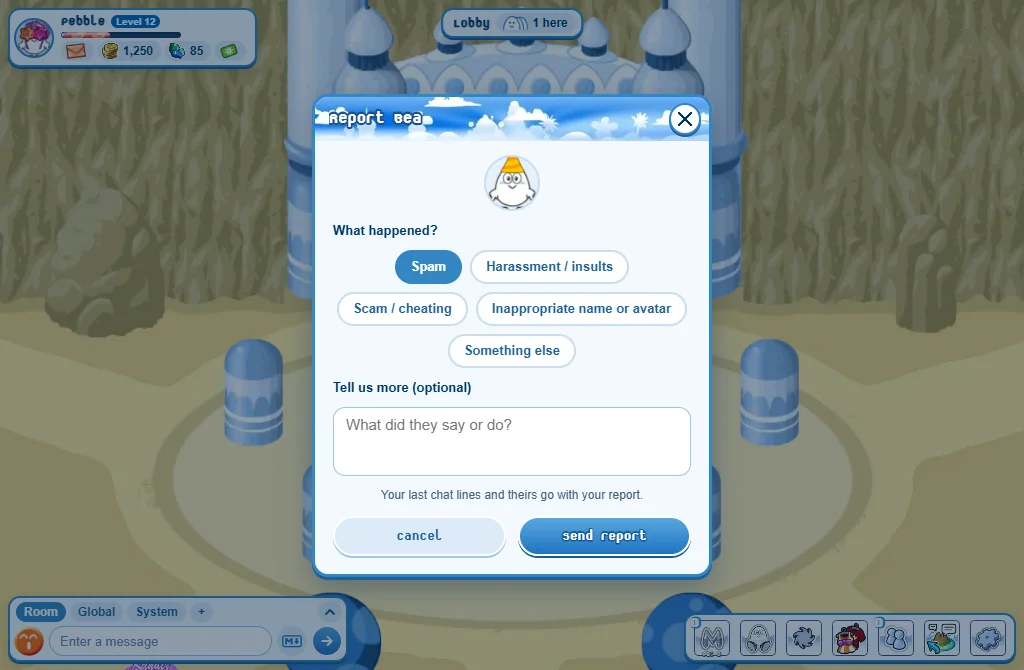
- Open the player’s menu (or their profile card) and press Report.
- Pick what happened: Spam, Harassment / insults, Scam / cheating, Inappropriate name or avatar or Something else.
- Add a few words if you want.
- Press Send report.
- Your last chat lines and theirs go with the report, so a moderator reads exactly what was said.
- A name in the Global chat can be reported the same way: press it.
Golden rules
- Never give your password to anyone. The Muniz team will never ask for it.
- Never share your real name, address, school, phone number or photos.
- Never buy or sell items, credits or accounts for real money with another player: it is against the rules, and often a scam.
- In a trade, read both offers again before you accept: all trades are final.
- If something upset or worried you, tell a grown-up you trust. You won’t be in trouble.