Trading
Playing together
A trade is a swap between two players standing in the same room. Each player must add at least one item, and both must agree twice before anything moves.
Before you can trade
- You and the other player must both be level 5 or more.
- Both accounts must be at least 2 weeks old.
- You must be in the same room.
Step 1: your trade list
Only the items in your trade list can be offered. That way nothing leaves by mistake.
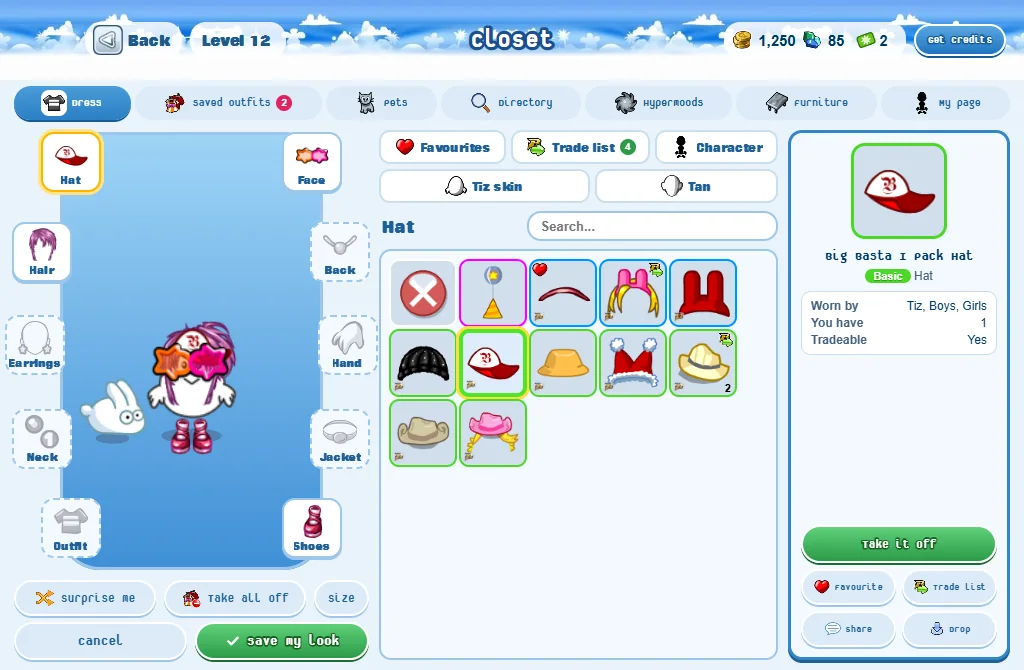
- Open your Closet.
- Press an item: its buttons show beside the items.
- Press Trade list.
- A small mark in an item’s bottom corner means it can be traded. In the Search... box’s filters, Tradeable shows only those.
Step 2: the trade
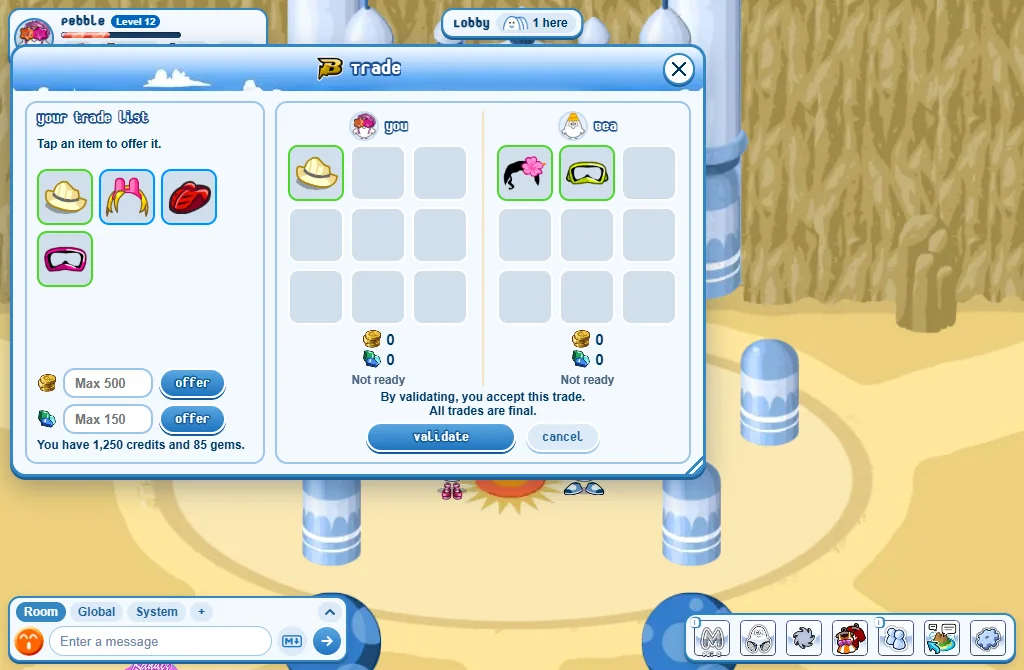
- Open the other player’s menu and press Trade. They get a note: Decline or Trade.
- In the Trade window, press items of your trade list to offer them. Press an offered item to take it back.
- Want to add credits? Type the number and press Offer (500 at most).
- When you are happy with both offers, press Validate. It stays off until each of you has put in at least one item, and the window tells you who is still missing one.
- When both of you have validated, a last question appears: Accept or Refuse. You have 60 seconds.
- Both accept: the trade is done.
- Any change to an offer unlocks you both: nobody can swap an item at the last second.
- Closing the window, or leaving the room, cancels the trade and everything comes back.
What can be traded
- Yes: clothes, characters and other items marked Tradeable, pets, and up to 500 credits.
- Each player must add at least one item. Credits can go along with items, but never alone: a pet counts as an item, credits don’t.
- Gems can’t be traded (since 27 October 2026): you earn them by playing and spend them in the Store. Items you bought with gems can be traded if they are marked Tradeable.
- No: furniture, the items everybody has, surprise boxes, wedding items, and anything marked Untradeable.
- A traded pet keeps its level, its abilities, its name and its colours.
Good to know
- All trades are final: the team can’t undo a trade you accepted.
- Someone promising to "give it back later" or to pay outside the trade window is a scam. Everything goes in the window.
- Your trade list shows on your player page: others can see what you are ready to swap.