Hypermoods
Your Tiz
A hypermood is a short effect: a potion that shrinks you, turns you to gold or into a ghost, and dozens more. Each use spends one, unless you own it for good.
Using one on yourself
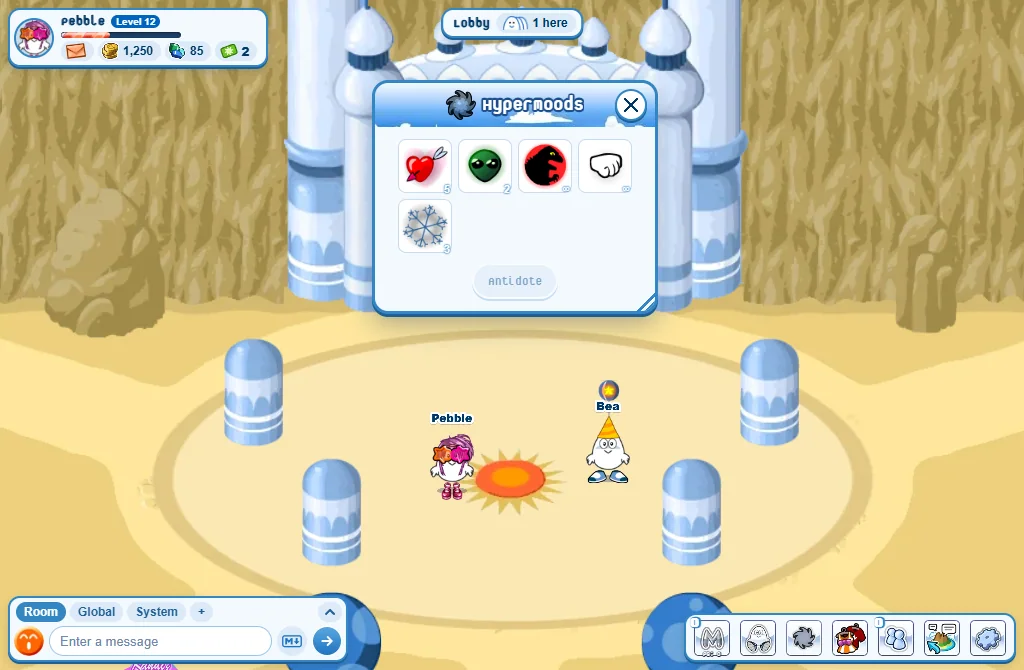
- Press the Hypermoods button (the third of the seven).
- Press a hypermood: it plays on you.
- The number on each one is how many uses you have left. ∞ means for ever.
Using one on someone else
- Right-click a player in your room (tap them on a phone).
- Press Hypermoods at the bottom of their menu.
- Pick one.
Getting more
- The Store’s Hypermoods tab: 1 use, or Permanent to own it for good.
- In your Closet’s Hypermoods section, pressing one you own buys one more use - while that hypermood is in the Store.
Good to know
- After any hypermood, all of them wait a few seconds before the next.
- A room plays 5 at a time at most.
- Tired of them? Settings, Privacy, Block hypermoods: nobody can use one on you.
- Hypermoods make sounds. To hear them no more: Settings, Game, switch Hypermood sounds off.